D2L-36 语义分割
Published:
本文介绍将图像中的每个像素分配到类别的语义分割任务,说明分割标签与数据集的处理方式,并给出 VOC 数据的读取、标签转换和裁剪示例。
🎦 本节课程视频地址 👇
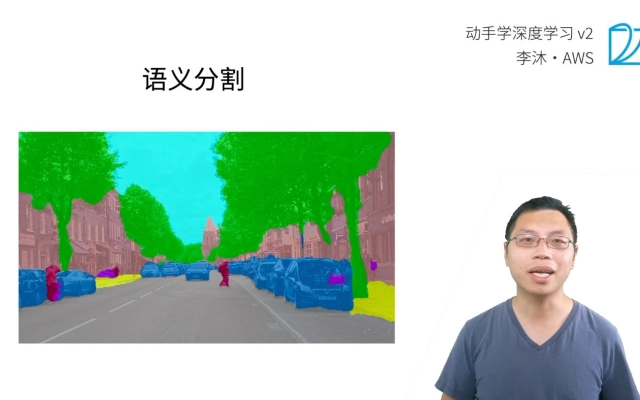
语义分割(semantic segmentation)
- 语义分割将图片中的像素分类到对应的类别
- 锚框太糙了
- 精细到像素的归属的labels
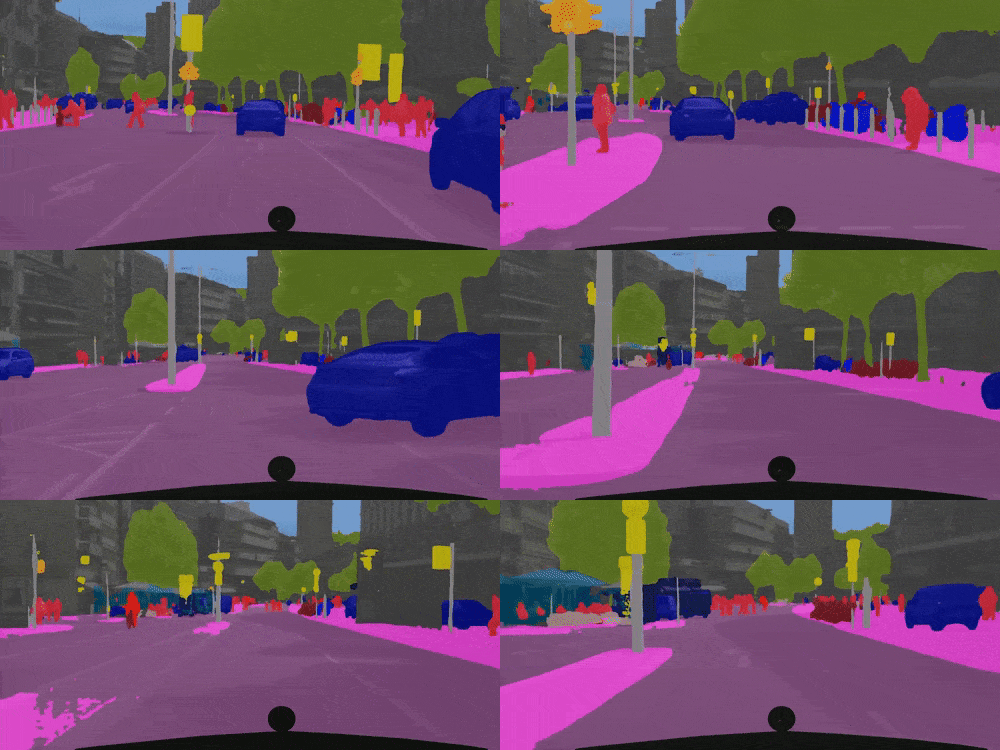
应用:路面分割
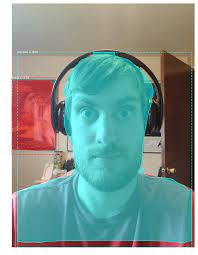
应用:背景虚化
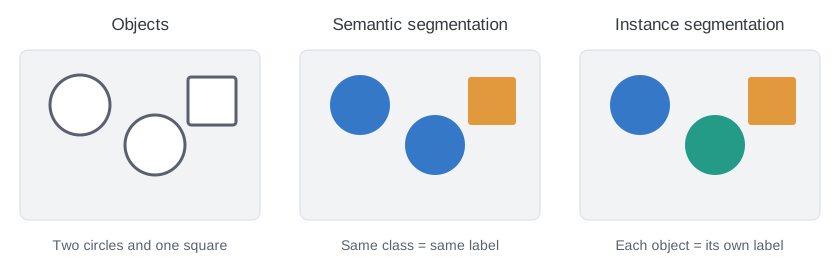
VS实例分割(Instance Segmentation)
- 语义分割只针对类
- 实例分割针对每一个类的实例
代码实现
数据集因为太大还没有下载成功,等有时间下载好了,再跑一遍最好
下载/读数据集
%matplotlib inline
import os
import torch
import torchvision
from d2l import torch as d2l


d2l.DATA_HUB['voc2012'] = (d2l.DATA_URL + 'VOCtrainval_11-May-2012.tar',
                           '4e443f8a2eca6b1dac8a6c57641b67dd40621a49')

voc_dir = d2l.download_extract('voc2012', 'VOCdevkit/VOC2012')

#将所有的图片和标签读入内存
def read_voc_images(voc_dir, is_train=True):
    """读取所有VOC图像并标注"""
    txt_fname = os.path.join(voc_dir, 'ImageSets', 'Segmentation',
                             'train.txt' if is_train else 'val.txt')
    #train.txt和val.txt分别是指导训练集和验证集的文件
    mode = torchvision.io.image.ImageReadMode.RGB
    with open(txt_fname, 'r') as f:
        images = f.read().split()
        #图片名称
    features, labels = [], []
    for i, fname in enumerate(images):
        features.append(torchvision.io.read_image(os.path.join(
            voc_dir, 'JPEGImages', f'{fname}.jpg')))
        #读取属于训练/验证集的图片
        labels.append(torchvision.io.read_image(os.path.join(
            voc_dir, 'SegmentationClass' ,f'{fname}.png'), mode))
        #语义分割的labels也是图片里的每一个像素,png格式没有压缩过图片
        #或者说是每个像素的值
        #训练出像素的值与实际值对比,作为损失并更新梯度
    return features, labels

train_features, train_labels = read_voc_images(voc_dir, True)

n = 5
imgs = train_features[0:n] + train_labels[0:n]
imgs = [img.permute(1,2,0) for img in imgs]#更改CHW为HWC,利于显示图片
d2l.show_images(imgs, 2, n);
#每一个类有一个对应的pixel的RGB值
#黑背景、白边框
#类型以红、绿、蓝分类
建立RGB映射
#每个标号与pixel颜色的映射
VOC_COLORMAP = [[0, 0, 0], [128, 0, 0], [0, 128, 0], [128, 128, 0],
                [0, 0, 128], [128, 0, 128], [0, 128, 128], [128, 128, 128],
                [64, 0, 0], [192, 0, 0], [64, 128, 0], [192, 128, 0],
                [64, 0, 128], [192, 0, 128], [64, 128, 128], [192, 128, 128],
                [0, 64, 0], [128, 64, 0], [0, 192, 0], [128, 192, 0],
                [0, 64, 128]]

VOC_CLASSES = ['background', 'aeroplane', 'bicycle', 'bird', 'boat',
               'bottle', 'bus', 'car', 'cat', 'chair', 'cow',
               'diningtable', 'dog', 'horse', 'motorbike', 'person',
               'potted plant', 'sheep', 'sofa', 'train', 'tv/monitor']

#构建从RGB到VOC类别索引的映射
def voc_colormap2label():
    colormap2label = torch.zeros(256 ** 3, dtype=torch.long)
    #全零向量,代表RGB的颜色256*256*256种
    for i, colormap in enumerate(VOC_COLORMAP):
        colormap2label[
            (colormap[0] * 256 + colormap[1]) * 256 + colormap[2]] = i
        #相当于把RGB经过换算的值处张量的索引与一个标量(也就是物体的类别)一一对应
        #最大索引处255*256**2+255*256+255=256**3
        #这样的算法避免出现重复
    return colormap2label

def voc_label_indices(colormap, colormap2label):
    #colormap2label意思是使用时把该函数作为参数传入,但这里变量的位置并不指代函数本身
    colormap = colormap.permute(1, 2, 0).numpy().astype('int32')
    idx = ((colormap[:, :, 0] * 256 + colormap[:, :, 1]) * 256
           + colormap[:, :, 2])
    #相当于把每个图片,h*w个像素一次性求RGBmap,然后放回一个索引的矩阵
    return colormap2label[idx]
    #再根据这个矩阵的索引,找到每个像素的类别(classes)
    #如果传参没有colormap2label,这里就要return colormap2label()[idx]
    #numpy的矩阵可以作为索引,默认是从最外的维度开始索引

y = voc_label_indices(train_labels[0], voc_colormap2label())
#这里是voc_colormap2label(),要把该函数的返回值向量colormap2label作为参数传入
y[105:115, 130:140], VOC_CLASSES[1]
基于剪裁的图像增广
#图片增广
#图片剪裁之后,标号之类的也会变化,所以要一一对应
#对图片不能resize,只能crop
#resize相当于拉伸和放缩,像素中间插值或者去值,但是label就不能随便插一个RGB值,
def voc_rand_crop(feature, label, height, width):
    rect = torchvision.transforms.RandomCrop.get_params(
        feature, (height, width))
    #,确定参数,feature确定被裁减的图片,(h,w)是随机裁剪的边界框大小
    feature = torchvision.transforms.functional.crop(feature, *rect)
    #裁剪
    #函数返回张量和图片
    label = torchvision.transforms.functional.crop(label, *rect)
    #label也做对应裁剪
    return feature, label

imgs = []
for _ in range(n):
    # n=5
    imgs += voc_rand_crop(train_features[0], train_labels[0], 200, 300)
    #返回的是张量,也就是说列表可以通过+得到其他iterable的数据
    #iterable的元素会被一个一个传入作为列表的元素
    #因为两个三维张量被 voc_rand_crop()打包成了一个元组,所以拆开刚好是张量本身
    #但要是加initerable,就需要append


imgs = [img.permute(1, 2, 0) for img in imgs]
d2l.show_images(imgs[::2] + imgs[1::2], 2, n);
#步长为2取值,相当于重新排序
定制类,把大部分功能都整合进类里
class VOCSegDataset(torch.utils.data.Dataset):
    """一个用于加载VOC数据集的自定义数据集"""

    def __init__(self, is_train, crop_size, voc_dir):
        self.transform = torchvision.transforms.Normalize(
            mean=[0.485, 0.456, 0.406], std=[0.229, 0.224, 0.225])
        #按照RGB求均值和方差
        self.crop_size = crop_size
        features, labels = read_voc_images(voc_dir, is_train=is_train) #读文件
        self.features = [self.normalize_image(feature)
                         for feature in self.filter(features)] #类的实例调用类方法
        self.labels = self.filter(labels)

        self.colormap2label = voc_colormap2label()
        #调用色号-类别映射向量
        print('read ' + str(len(self.features)) + ' examples')

    def normalize_image(self, img):
        return self.transform(img.float() / 255)

    def filter(self, imgs):
        return [img for img in imgs if (
            img.shape[1] >= self.crop_size[0] and
            img.shape[2] >= self.crop_size[1])] #保证比截取大

    def __getitem__(self, idx):
        feature, label = voc_rand_crop(self.features[idx], self.labels[idx],
                                       *self.crop_size)#(h, w)
        return (feature, voc_label_indices(label, self.colormap2label))
    #拿出每个剪裁过的feature,以及label的颜色里对应的类别编号
    #label是已经做过语义分类的块,所以每个块(类别)标号都一致

    def __len__(self):
        return len(self.features)

crop_size = (320, 480)
voc_train = VOCSegDataset(True, crop_size, voc_dir)
voc_test = VOCSegDataset(False, crop_size, voc_dir)
创建数据集和整合
batch_size = 64
train_iter = torch.utils.data.DataLoader(voc_train, batch_size, shuffle=True,
                                    drop_last=True,
                                    num_workers=d2l.get_dataloader_workers())
#因为在实例里transform过,所以在这里没有normalize
#先read,再load
#read相当于把图片从文件夹的png转换成tensor,并做transform
#loader相当于从图片的tensor集里取批量
#__getitem__()使实例可以被索引,或者说每次取批量返回的值,就是调用了该函数的返回值
for X, Y in train_iter:
    print(X.shape)
    print(Y.shape)
    break

##整合出所有数据集##
def load_data_voc(batch_size, crop_size):
    voc_dir = d2l.download_extract('voc2012', os.path.join(
        'VOCdevkit', 'VOC2012'))
    num_workers = d2l.get_dataloader_workers()
    train_iter = torch.utils.data.DataLoader(
        VOCSegDataset(True, crop_size, voc_dir), batch_size,
        shuffle=True, drop_last=True, num_workers=num_workers)
    test_iter = torch.utils.data.DataLoader(
        VOCSegDataset(False, crop_size, voc_dir), batch_size,
        drop_last=True, num_workers=num_workers)
    return train_iter, test_iter
心得体会
写了这么多代码,发现面向对象的方式可以很方便地实现集成功能,把所需要的函数、属性定义在类里,通过创造实例来简化程序。并且在定义类时,可以把与程序输入输出无关的中间变量都内置化,实现输入——输出的简单逻辑关系,方便程序的运行。